
Sponsored
Five more minutes.” If those three words have ever kicked off a standoff in your living room, pull up a chair.
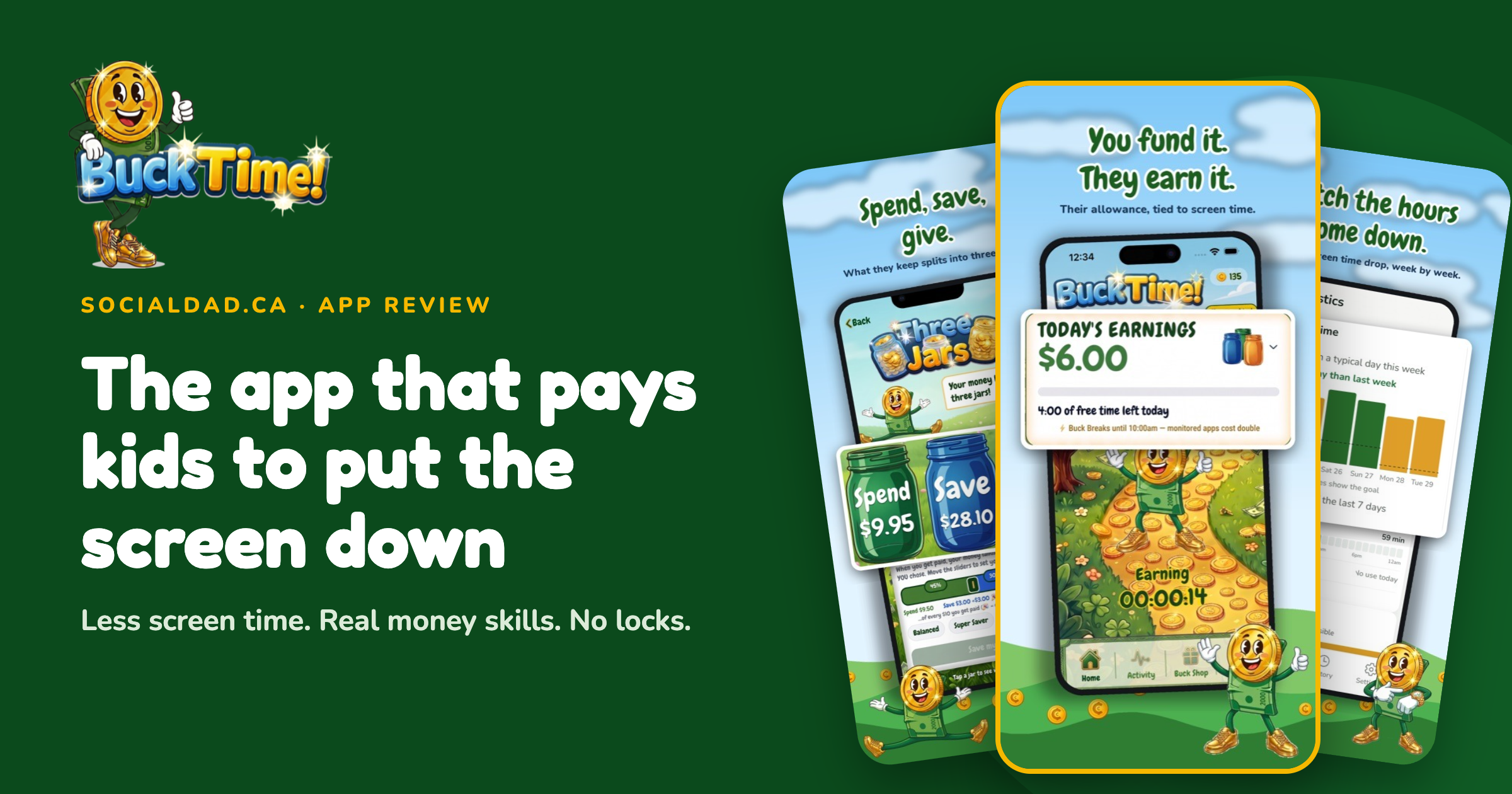
BuckTime! is a Canadian screen time app that gives kids a daily allowance and lets them decide whether to keep the money or spend it on extra screen time. Stay under the free daily screen time and the cash is theirs. Go over on the apps you’ve picked, and every extra minute takes a small bite out of the day’s money. Nothing gets locked or blocked.
Download Here:
Apple App Store
Google Play App Store

That last part is what grabbed me. I’ve watched enough tablet-timer meltdowns to know that locks start fights. BuckTime! hands the decision to the kid and puts a price on it, which makes for a very different conversation at 7:45 on a school night. Toronto dad Mark Darcy built it for his own family, and it landed on the App Store and Google Play on September 17, 2026.
What is BuckTime! and how does it work?
Setup comes down to three decisions. You pick a daily allowance, which apps count against it, and how much free screen time your kid gets before the meter starts running. Past that free time, each extra minute on the counted apps costs a little of that day’s money. Whatever’s left at bedtime is theirs to keep.
Then comes the clever bit. You set a long-term screen time goal, and the free time steps down toward it week by week. After a rough week, the goal holds instead of dropping again, and for the first month you approve each step yourself. Nobody gets blindsided.

Buck Breaks are my favourite feature on paper. You pick windows like dinner or homework, and screen time costs double during them. A phone at the dinner table suddenly comes with a very visible price tag.
BuckTime! runs on iPhone, iPad and Android, and it can count time on a child’s Mac or Windows PC too. That matters if your kid’s gaming happens on a laptop. The company recommends switching on Apple Screen Time or Google Family Link first and running BuckTime! alongside them. Details are on bucktime.ca.

Why paying kids to cut screen time makes sense
Most Canadian kids blow past the recommended screen time, and it gets worse with age. The Canadian 24-Hour Movement Guidelines suggest no more than two hours of recreational screen time a day for kids aged 5 to 17. Statistics Canada found that 54% of children and youth aged 3 to 17 went over the guidelines in 2024. Teens are the toughest crowd: only 28% of youth met the target, compared with 62% of younger kids.
The Canadian Paediatric Society cares less about the stopwatch these days and more about what screens push aside. It wants families to put school, physical activity, sleep and family meals ahead of devices. Buck Breaks fit that advice neatly, since they make dinner and homework the priciest screen time of the day.
My honest read? Locks work right up until they don’t, and then you get the meltdown, the bargaining, and the kid who found a workaround on YouTube. Paying kids to stay under a limit gives them their own reason to want less screen time. One parent quoted in BuckTime!’s media kit summed it up in four words: “No more arguing!!”

Spend, Save and Give: the money lessons hiding inside
Every day your kid keeps their allowance is a tiny lesson in money management. What they hold onto at bedtime gets split across three jars: Spend, Save and Give. Kids can set a savings goal with a picture and price of whatever they’re dreaming about, then watch it creep closer. Money School and the Word Bank add short lessons on money basics, so words like “budget” and “interest” stop sounding like grown-up secrets.
Canadian parents clearly want help with this. In a 2025 TD survey, 96% of parents rated financial literacy as at least as important as media literacy, yet only 43% felt confident in their child’s money knowledge. Allowance is fading too. Mydoh’s 2026 report with Ipsos found that just 35% of parents regularly give their kids an allowance, a noticeable drop from its 2024 numbers. An app that ties allowance to a daily habit could pull some of those families back in.
Dough’Nate: giving, built right in
The Give jar is where BuckTime! gets a little heartwarming. Through Dough’Nate, kids choose from more than 25 Canadian charities and donate from their own jar. The screenshots show options like the Canadian Cancer Society and Food Banks Canada. My kid picking a cause and paying for it with screen time she skipped? I’d frame that receipt.
Natasha P., a parent quoted in the media kit, said the system felt fair to her son because it “wasn’t punitive.” He spent the time reading and playing sports, knowing he was earning money and helping other kids along the way.
Does BuckTime! actually reduce screen time?
Too early to say for sure, since the app has only been out since September 2026 and nobody has run an independent study yet. Early parent feedback is strong, though. Amy F. said it helped her family cut device time “without major meltdowns,” which is the holy grail in my house. The Statistics screen tracks screen time week by week, so you’ll find out quickly whether it’s working for your kids.
One thing to keep straight: the allowance comes out of your pocket. Pick a daily amount you’d happily pay every single day, because a kid who aces the week will collect all of it.
Privacy: what the app can and can’t see
BuckTime! sees which of your chosen apps are open and for how long. It doesn’t see messages, photos or location, and the website adds browsing history and contacts to that list. There are no ads. The company behind it is based in Toronto.
How much does BuckTime! cost in Canada?
The Basic plan is free for one child on one device, and it already covers step-down goals, daily earning, cash payouts, the three jars and Money School. The Family plan costs CA$6.99 a month or CA$59.99 a year. That adds unlimited kids and devices, a second parent, fitness rewards, jar matching, Save-jar payouts and a weekly digest. Paying yearly works out to about $5 a month and saves you roughly $24 over monthly billing.

Who BuckTime! is for
BuckTime! makes the most sense for families who already do an allowance or keep meaning to start one. It suits kids old enough to know that $3.40 is less than $6.00, and parents who are tired of being the household screen time referee. If your kid is saving for something specific, like a LEGO set or a new game, the savings goal will do a lot of the motivating for you. The company doesn’t list an age range, but my guess is it starts to click somewhere in early elementary school.
BuckTime! won’t shut an app off at 8 p.m., so you’ll still need Apple Screen Time or Google Family Link for that job. It’s also a tough fit if a daily allowance doesn’t work in your budget right now, or if your kids are preschoolers still working out what money even is.

Before you wrap a phone this Christmas
Plenty of Canadian kids are about to unwrap their first phone or tablet. BuckTime! offers a free 14-page guide called the First Device Agreement, with eight things to set up before the handover and a printable family agreement. Grab it at bucktime.ca/#guide. Even if you never download the app, that agreement is worth printing and sticking on the fridge.
My take on BuckTime!
I’m into it. Putting a price on screen time and handing your kid the wallet feels like the most honest way to teach trade-offs, and the Give jar is a lovely touch. My one hesitation is that paying kids to avoid screens could make screens feel more valuable, so I’d keep an eye on that. Still, a Canadian app that rolls screen time, allowance and charity into one daily habit deserves a shot, especially when the basic version costs nothing. You can download it at get.bucktime.ca/app.
BuckTime! FAQ
Is BuckTime! free? Yes. The Basic plan is free for one child on one device. The Family plan costs CA$6.99 a month or CA$59.99 a year and covers unlimited children and devices.
Is BuckTime! a Canadian app? Yes. BuckTime! was built by Toronto dad Mark Darcy and is made by a Toronto-based company. Kids can donate to more than 25 Canadian charities through the app.
Does BuckTime! block apps? No. BuckTime! doesn’t lock or block anything. Extra minutes on the apps you choose cost money from your child’s daily allowance, and the company recommends using it alongside Apple Screen Time or Google Family Link.
What devices does BuckTime! work on? BuckTime! works on iPhone, iPad and Android phones and tablets. It can also count screen time on a child’s Mac or Windows PC.
What are Buck Breaks in BuckTime!? Buck Breaks are times you set, such as dinner or homework, when screen time costs double.
Can BuckTime! see my child’s messages or photos? No. BuckTime! only sees which chosen apps are open and for how long. It doesn’t see messages, photos or location, and the app has no ads.
Over to you
Would you pay your kid to put the screen down, or does that feel a bit too much like bribery? Tell me in the comments, I genuinely want to know where other dads land on this one.
Sources
- BuckTime! website
- Statistics Canada: screen time and physical activity among children and youth
- Statistics Canada: The Daily, October 17, 2025
- CMAJ: Canadian Paediatric Society on quality of kids’ screen time
- Global News: Almost 40% of Canadian youth exceed recommended screen time
- TD Stories: financial literacy for kids survey
- Mydoh Financial Resilience Report 2026



Leave a Reply